



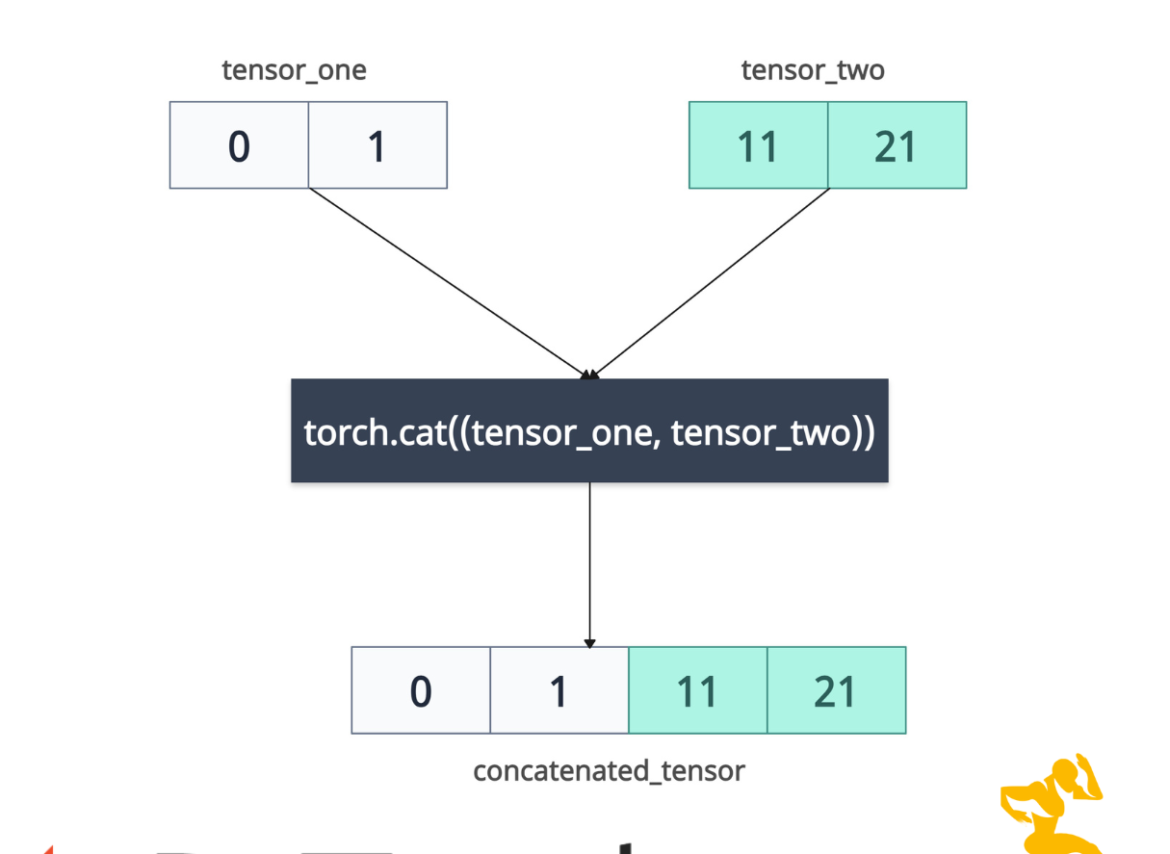

The torch.cat() method concatenates the input tensors in the given dimension. It requires input tensors to have the same number of dimensions, and the same shapes, except the concatenation dimension.
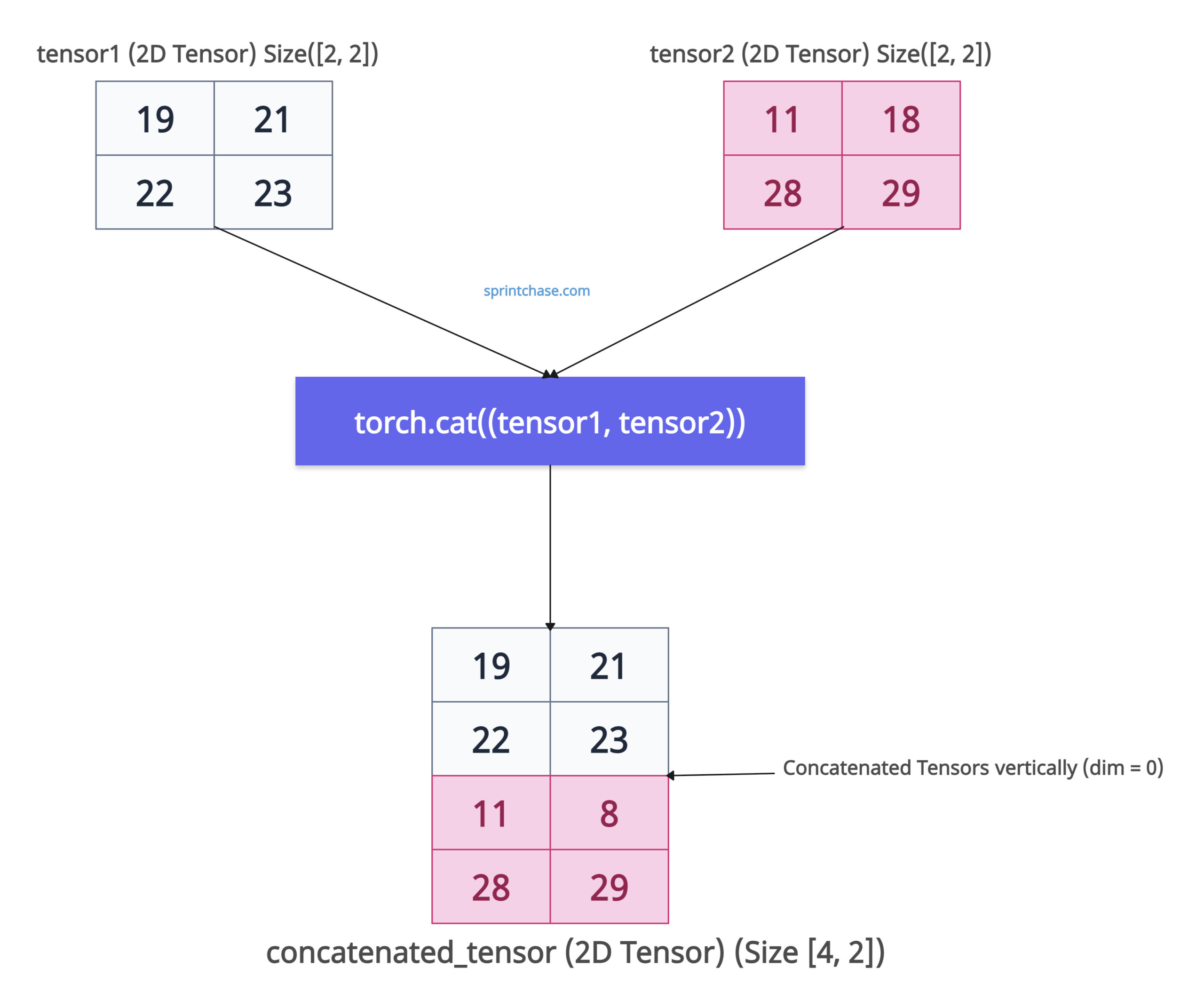
The above figure shows that we concatenated two tensors vertically by adding new rows. The main purpose of this method is to combine tensors without adding a new dimension.
The torch.cat() is different from torch.stack() because .cat() does not create a new dimension whereas .stack() does it. The torch.split() method does exactly opposite of .cat() method.
Function signature
torch.cat(tensors, dim=0, out=None)
Arguments
| Name | Value |
| tensors (sequence of Tensors) | It is a tuple or list of tensors to concatenate. Tensors must be on the same device and dtype. |
| dim (int, optional) | It is the dimension along which to concatenate. Default, dim = 0.
|
| out (Tensor, optional) | If you have a pre-allocated tensor, you can write the combined tensor in this “out” tensor. |
Concatenation along rows (dim=0)
If you have two tensors with 2×2 dimensions and concatenate along dimension 0, the output tensor would have 4×2 dimensions.
import torch

tensor1 = torch.tensor([[19, 21], [22, 23]])

print(tensor1.shape)
# Output: torch.Size([2, 2])

tensor2 = torch.tensor([[11, 18], [28, 29]])

print(tensor2.shape)
# Output: torch.Size([2, 2])

concatenated_tensor = torch.cat((tensor1, tensor2))

print(concatenated_tensor)
# Output:
# tensor([[19, 21],
#         [22, 23],
#         [11, 18],
#         [28, 29]])

print(concatenated_tensor.shape)
# Output: torch.Size([4, 2])
In the above code, we combine two 2×2 tensors vertically (along rows) using torch.cat().
Concatenation along columns (dim=1)
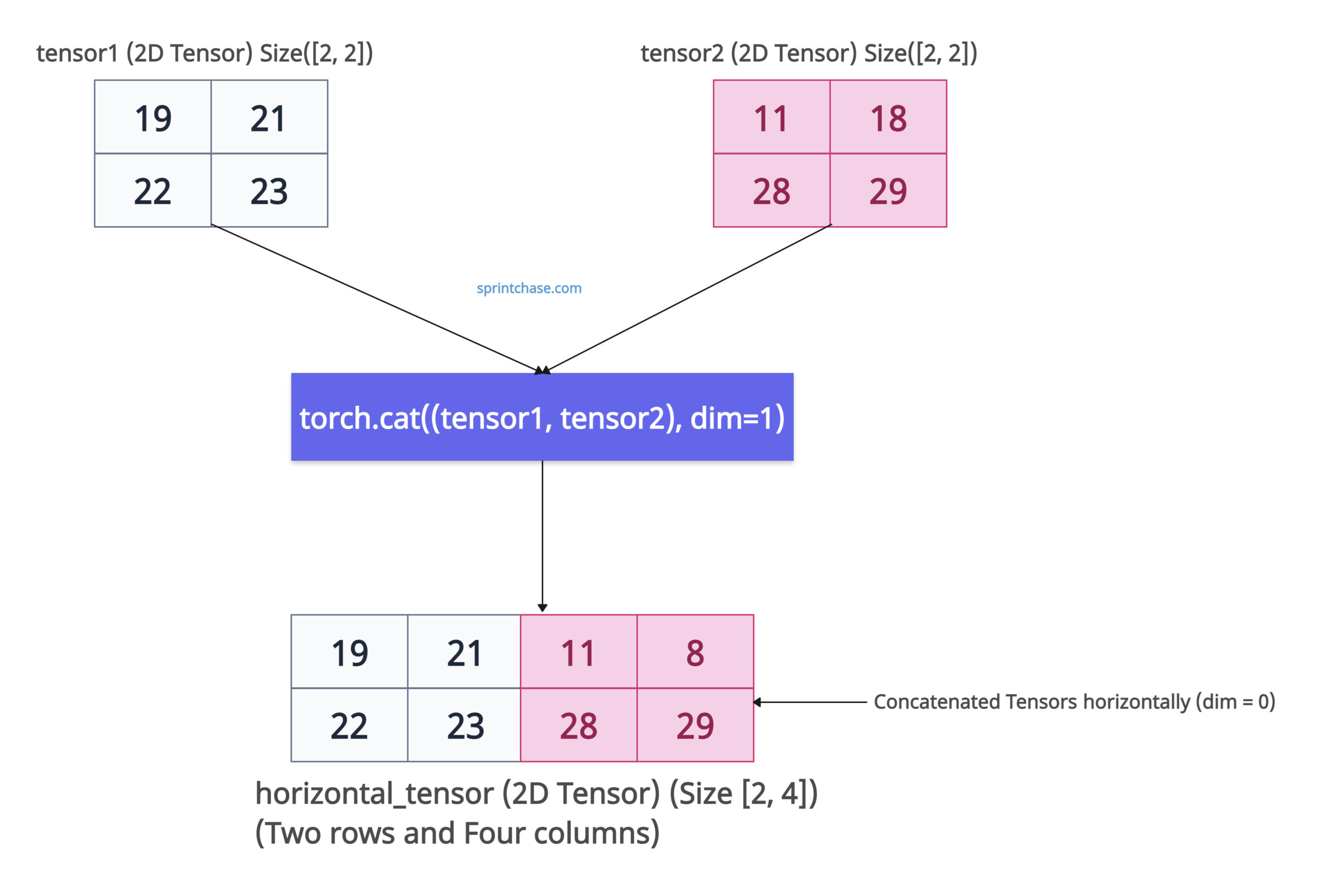
If you pass the dim=1 argument, it will concatenate the input tensors along columns, which means horizontally!
import torch

tensor1 = torch.tensor([[19, 21], [22, 23]])

print(tensor1.shape)
# Output: torch.Size([2, 2])

tensor2 = torch.tensor([[11, 18], [28, 29]])

print(tensor2.shape)
# Output: torch.Size([2, 2])

horizontal_tensor = torch.cat((tensor1, tensor2), dim=1)

print(horizontal_tensor)
# Output:
# tensor([[19, 21, 11, 18],
#         [22, 23, 28, 29]])

print(horizontal_tensor.shape)
# Output: torch.Size([2, 4])
Since the two input tensors have Size [2, 2], after concatenating along columns, the output tensor will have [2, 4] dimensions. You can see that two new columns have been added.
If you want to add rows, use dim=0. If you want to add columns, use dim=1.
Concatenate with “out” argument
If you created a pre-allocated tensor using either torch.empty() or torch.zeros() method, you just need to write that tensor with a concatenated tensor.
import torch

tensor1 = torch.tensor([19, 21])

print(tensor1.shape)
# Output: torch.Size([2])

tensor2 = torch.tensor([11, 18])

print(tensor2.shape)
# Output: torch.Size([2])

output_tensor = torch.empty(4, dtype=torch.int)

torch.cat((tensor1, tensor2), out=output_tensor)

print(output_tensor)
# Output: tensor([19, 21, 11, 18], dtype=torch.int32)

print(output_tensor.shape)
# Output: torch.Size([4])
You can see the output tensor. It has 1D, but it has four elements, which are combined from both tensors.
Concatenation with 3D Tensors
We can create random 3D tensors with values sampled from a standard normal distribution using torch.randn() method. Then, combine them using the .cat() method.
import torch

tensor_3d_one = torch.randn(2, 3, 4)

print(tensor_3d_one.shape)
# Output: torch.Size([2, 3, 4])

tensor_3d_two = torch.randn(2, 3, 4)

print(tensor_3d_two.shape)
# Output: torch.Size([2, 3, 4])

result_tensor = torch.cat((tensor_3d_one, tensor_3d_two), dim=1)

print(result_tensor.shape)
# Output: torch.Size([2, 6, 4])
You can see that the result_tensor has two batches, six rows (from 3+3), and four columns. That means we stacked two 3D tensors along the middle dimension, resulting in a new tensor of shape [2, 6, 4].
