






The torch.complex() method constructs a complex tensor from two real-valued tensors representing the real and imaginary components. The output tensor has a complex dtype (torch.complex64 or torch.complex128).
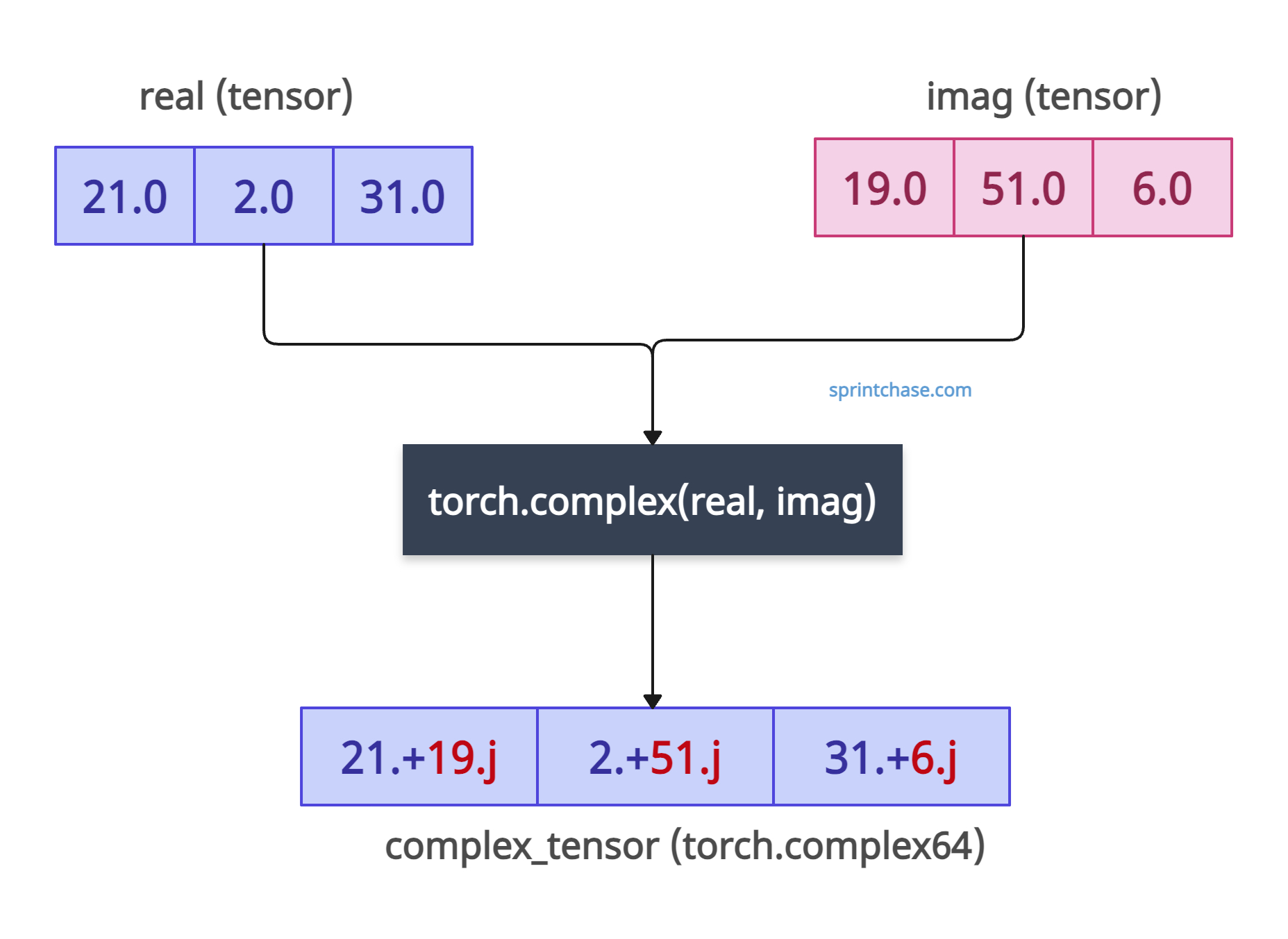
If the input data type is float32, the output type is complex64.
Each element is of the form real + imag * 1j of the output tensor.
If input tensors are not of type torch.float32 or torch.float64 and both real and imaginary input tensors’ shapes don’t match, PyTorch raises an error.
The main use cases of complex numbers are in the Fourier transforms or complex neural networks.
Syntax
torch.complex(real, imag, out=None)
Parameters
| Argument | Description |
| real (Tensor) | It is a floating-point tensor containing the real component of the complex tensor. |
| imag (Tensor) | It is a tensor containing imaginary components. It must have the same size, dtype, and device as real. |
| out (Tensor, optional) | It defines the output result to store into. |
Creating a complex tensor
import torch

# Define real and imaginary tensors
real = torch.tensor([21.0, 2.0, 31.0])
imag = torch.tensor([19.0, 51.0, 6.0])

# Create complex tensor
complex_tensor = torch.complex(real, imag)

print(complex_tensor)

# Output: tensor([21.+19.j,  2.+51.j, 31.+6.j])

print(complex_tensor.dtype)

# Output: torch.complex64
The output shows that it follows the pattern of the complex number real[i] + imag[i] * 1j. An i is real and j is complex here.
Since the values of input tensors are of type torch.float32, it returns torch.complex64 type of complex tensor.
Working with 2D Tensors

Let’s create a 2D complex tensor for matrix operations.
import torch

# Define 2D real and imaginary tensors
real = torch.tensor([[15.0, 25.0], [53.0, 4.0]])
imag = torch.tensor([[55.0, 56.0], [75.0, 8.0]])

# Create complex tensor
complex_2d = torch.complex(real, imag)

print(complex_2d)

# Output:
# tensor([[15.+55.j, 25.+56.j],
#         [53.+75.j,  4.+8.j]])
Handling Different Dtypes
Let’s use double-precision inputs for higher accuracy.
If the input data type is float64, the output type of a complex tensor is complex128.
import torch

# Double-precision inputs
real = torch.tensor([1.0, 2.0], dtype=torch.float64)
imag = torch.tensor([3.0, 4.0], dtype=torch.float64)

# Create complex tensor
complex_double = torch.complex(real, imag)

print(complex_double)
# Output: tensor([1.+3.j, 2.+4.j], dtype=torch.complex128)
Here, you can see that we got the complex128 output tensor.
Fourier Transform
We can create a complex tensor as input for a Fourier transform.
For creating a real tensor, we can use a torch.ones() method.
For creating an imaginary tensor, we can use a torch.zeros() method.
To create a fourier transform, we use the torch.fft.fft() method.
import torch

# Real and imaginary parts for a signal
real = torch.ones(4)
imag = torch.zeros(4)

# Create complex signal
signal = torch.complex(real, imag)

# Perform FFT
fft_result = torch.fft.fft(signal)

print(fft_result)

# Output: tensor([4.+0.j, 0.+0.j, 0.+0.j, 0.+0.j])
Here, the real and imaginary parts represent signal components.
Using the “out” argument
We can store the result in a pre-allocated tensor using the “out” argument.
Use the torch.empty() method to create a pre-allocated tensor.
import torch

# Define real and imaginary parts
real = torch.tensor([1.0, 2.0])
imag = torch.tensor([3.0, 4.0])

# Pre-allocate output tensor
out = torch.empty(2, dtype=torch.complex64)

# Create complex tensor with out parameter
torch.complex(real, imag, out=out)

print(out)
# Output: tensor([1.+3.j, 2.+4.j])
That’s all!
